1. Purpose

The averaging algorithm reduces the average entry price in long (or increases it in short) when the market moves against the position.
It does not trade merely on a price drop/rise: first, the system starts searching for an entry point, and only then executes averaging if a confirmation signal is present.
Correlation with a market "leader" is not used when making the averaging decision.
Examples below refer to long; for short the logic is mirrored.
2. Market phase settings
Long:
- Bull market — allow more frequent/earlier averaging (aggressive).
- Bear market — average less frequently and farther from price (conservative).
Short:
- Bull market — conservative.
- Bear market — aggressive.
All trades, including averaging, require a confirmation on a pullback or in a zone with a high probability of a pullback on the selected timeframe.
3. Logic
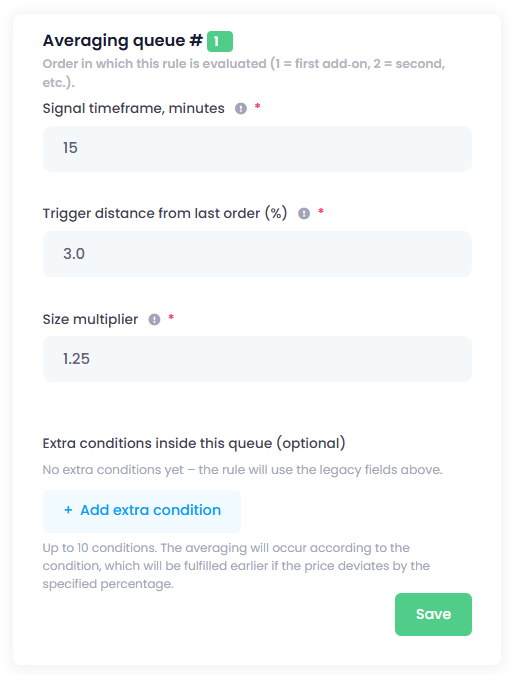
Search activation.
Price declines from the average entry by a configured threshold — this only triggers analysis.
Decision.
- Indicators show a high probability the correction is ending → execute averaging.
- Indicators point to continuation against the position → wait.
Averaging size.
- Size multiplier:
new_add_on = current_position × multiplier. - Buy the base asset (spot: coins; futures: contracts), not USDT.
- In long, each subsequent add-on is executed at a lower price than the previous one; in short — at a higher price.
4. Criteria for averaging
The algorithm uses, among others:
- overbought/oversold levels;
- open interest;
- volumes and volume delta;
- average price
- sentiment.
Timeframes:
- Lower TFs — more noise.
- Higher TFs — rarer but stricter signals.
- If there is no signal — the position is held as long as required.
5. Example
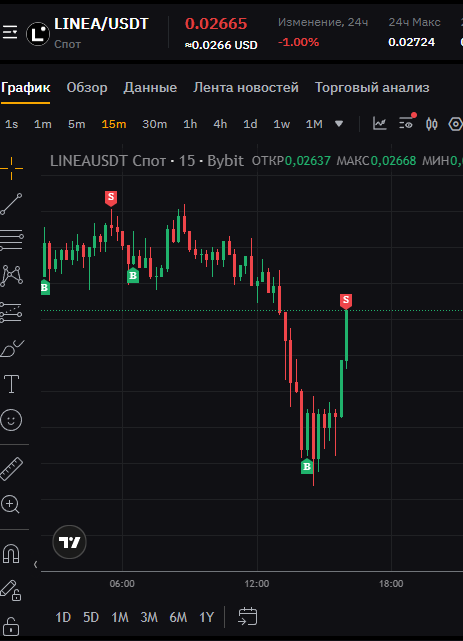
A long position on LINEA is open; the take-profit limit was not filled; price is declining.

Settings (bull market).
- Activation threshold for search — 3%.
- Timeframe for the first entry point — 15 minutes.
Flow.
- Drawdown exceeded 4% → search for an averaging entry is started.

- Confirmation: oversold zone + buyer strength → add-on executed.

- Take-profit triggered afterwards → trade closed.
6. Extra conditions (cascade)
The cascade is used to avoid waiting for a setup to complete on a higher timeframe when price goes deeper against the position. The deeper the drawdown, the earlier (on a lower TF) the confirmation is searched for — with the unchanged rule that averaging is executed only when a reversal signal is present.
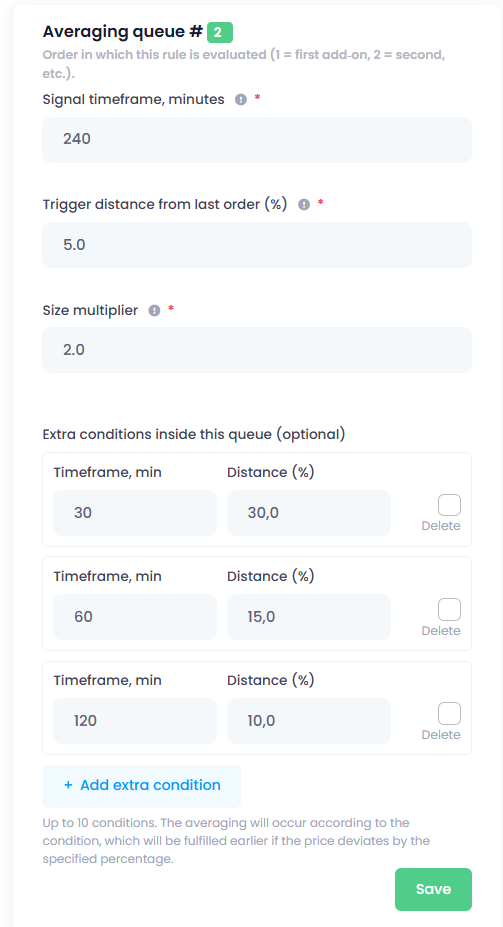
Example: second averaging (long).
- Base queue settings:
signal TF = 240 minutes (H4),trigger from the last add‑on = 5%. - Price drops ≥ 5% → start searching for an averaging entry on H4.
- Extra conditions inside the queue override the search TF when the drawdown deepens:
- ≥ 10% → search for confirmation on 120 min (H2);
- ≥ 15% → search on 60 min (H1);
- ≥ 30% → search on 30 min (M30).
Cascade rules:
- Upon hitting a threshold, the search switches to the specified lower TF.
- If no confirmation on the selected TF and price goes deeper, the next (even lower) condition becomes active.
- The cascade changes only the confirmation timeframe. All other criteria and sizing rules remain unchanged.
The idea is simple: with a deep drawdown, waiting for an H4 setup can take too long; confirmation is more reasonable to look for on lower TFs where the reversal point forms earlier.
7. Summary
Averaging consists of two steps: trigger → confirmation.
Market‑phase profiles and the cascade provide flexibility without complicating the logic.
If you do not plan to trade in a given phase, leave its parameters unset; the module will activate after the phase changes.