June 1, 2026, 9 p.m.
Trap Radar PRO
This block configures manual or automatic entry by Trap Radar signal.
Trade execution
Turn on Enable trade execution.
For stable operation, prefer Hedge Mode and Cross Margin. Leverage is taken from current instrument settings on the exchange.
Execution source
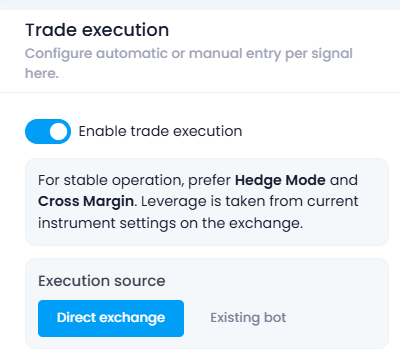
Select the execution source:
- Direct exchange — entry via exchange API keys.
- Existing bot — entry via an existing bot, if this mode is connected.
Direct exchange connection
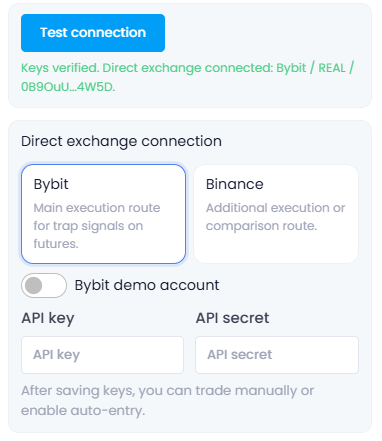
In Direct exchange connection, select the exchange:
- Bybit — main execution route.
- Binance — additional execution or comparison route.
For Bybit, the Bybit demo account switch is available. Binance has no demo switch.
Fill in:
- API key
- API secret
Click Test connection. If the keys are valid, the system will show a successful connection message.
Entry parameters
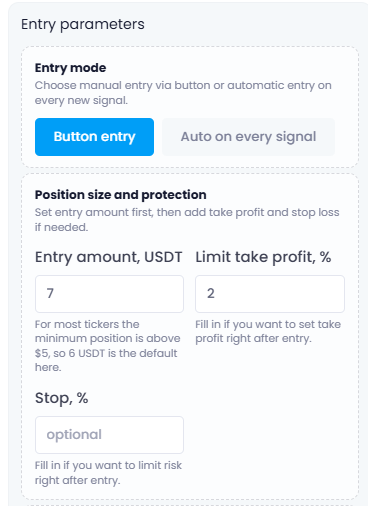
In Entry mode, select:
- Button entry — manual entry by button.
- Auto on every signal — automatic entry on every new signal.
In Button entry mode, the entry button appears after clicking a signal. Click Open position to open a trade with the configured parameters.
Position size and protection
In Position size and protection, set:
- Entry amount, USDT — position size.
- Limit take profit, % — take profit after entry.
- Stop, % — risk limit after entry.
The Stop, % field can be left empty.
#hashtags
Recent Posts
Smart-Take: Profit …
An optional take-profit function that closes a pr…
Trap Radar Bot: Pre…
A short pre-launch FAQ for Trap Radar Bot
Trap Radar Bot: Dir…
Direction and limit status is shown in Overview
Trap Radar Bot: Pos…
Each exit mechanism is enabled and configured sep…
Trap Radar Bot: How…
It is configured separately from DCA and uses the…
You might be interested
Spot Bot: Entry and Averaging Logic (Spot-Bot)
Spot-Bot operates on the “leader → altcoins” model.
The user selects a leader (BTC, ETH, or SOL), and the bot uses it as the main indicator of market direction.
The bot’s goal is to identify altcoins with strong correlation to the leader and open spot positions when growth probability is confirmed for both the leader and the altcoin.
Averaging Positions
Position averaging: trigger→confirmation scheme, timeframe cascade, market-phase settings, averaging examples
Indicator “Market Median”
“Market Median — 30m” is a single percentage value showing where, on average, the altcoin market sits relative to the midlines of its 30-minute regression channels over the last 1000 candles.