Trap Radar Backtest

How to enable signal history check, set TP / SL levels, and read Trap Radar backtest results.

June 1, 2026, 9:35 p.m.
Trap Radar PRO
Trap Radar Backtest

Backtest shows what would have happened to Trap Radar signals at the configured take profit and stop loss levels.
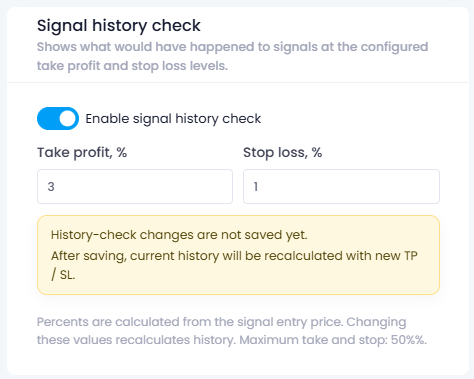
Signal history check

Enable Enable signal history check.

Set:

  • Take profit, %
  • Stop loss, %

Percent values are calculated from the signal entry price. The maximum value for take profit and stop loss is 50%.

History recalculation

After saving, current history will be recalculated with the new TP / SL.

Backtest does not run immediately at the moment of configuration. Recalculation is performed at night on existing signal history.

Result card

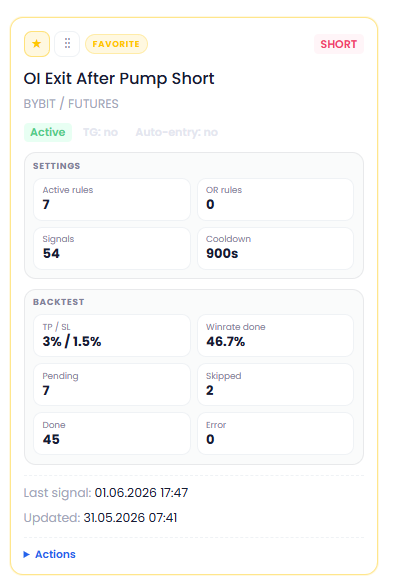
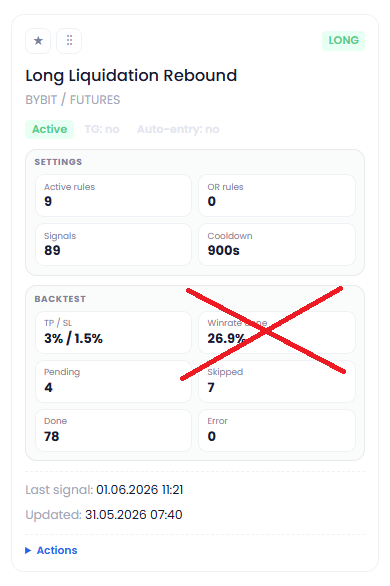
The Trap Radar card shows the Backtest block.

Main fields:

  • TP / SL — take profit and stop loss levels.
  • Winrate done — winrate for completed signals.
  • Pending — signals without a final result yet.
  • Skipped — skipped signals.
  • Done — completed signals.
  • Error — signals with check errors.

How to read the result

A usable backtest should have enough completed signals and clear statistics.

Example: a strategy with a filled Backtest block, non-zero Done, clear Winrate done, and no errors is suitable for further review and adjustment.
Important

Backtest checks the Trap Radar idea on signal history. Before live use, account for fees, slippage, liquidity, and actual execution parameters.
Recent Posts

Trap Radar Backtest How to enable signal history check, set TP / SL l…
Limits, DCA, and Po… How to set new entry permission, DCA permission, …
Trade Execution in … How to enable trade execution in Trap Radar, conn…
Trap Radar Telegram… How to link Telegram, add a bot token, and enable…
Creating Trap Radar How to create Trap Radar, select the market, set …

You might be interested

Spot Bot: Entry and Averaging Logic (Spot-Bot)
Spot-Bot operates on the “leader → altcoins” model. The user selects a leader (BTC, ETH, or SOL), and the bot uses it as the main indicator of market direction. The bot’s goal is to identify altcoins with strong correlation to the leader and open spot positions when growth probability is confirmed for both the leader and the altcoin.
Averaging Positions
Position averaging: trigger→confirmation scheme, timeframe cascade, market-phase settings, averaging examples
Indicator “Market Median”
“Market Median — 30m” is a single percentage value showing where, on average, the altcoin market sits relative to the midlines of its 30-minute regression channels over the last 1000 candles.
Automate Your Trading with Algorithms
A complete trading suite: from indicators and screeners to trading bots.
🚀 Start for free