A solid starting point for building your own referral network: create a public Telegram channel and auto-post your bot’s trade closures with your referral link.
Many traders have zero refs and no plan to get the first one — this channel solves both: it provides transparent showcase content and gently converts subscribers into partners.
Referral program not only reduces your platform fees but can also generate additional income.
1) Create the channel
- Telegram → New channel.
- Add a clear name and short description (what the channel is and for whom).
- First post: who you are, your strategy, how the bots work (optionally add 2–3 hashtags and an image).
2) Add your bot as an admin
- Channel → Manage channel → Administrators → Add administrator.
- Enter the @username of your personal bot (created via @BotFather).
- Confirm and Save.
The bot must be an admin to publish posts.
3) Enable posting on the platform
- Open the target trading bot card → Notifications tab.
- Enable “Position close” notifications.
- Enter your channel ID and Save.
How to find the channel ID
- Forward any message from the channel to @userinfobot.
- You’ll get the title and a line like
Id: -100xxxxxxxxxx. - Paste this ID on the site.
4) Verify
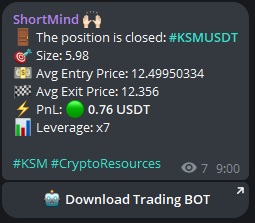
The next closed trade will appear in your channel automatically, with your embedded referral link.
If nothing shows up, check that your bot is an admin and that the channel ID is correct.
5) Multiple strategies (optional)
If you have multiple trading bots, it’s best to create separate “Telegram bot + channel” pairs for each strategy.
This way, each channel becomes an independent referral source for its specific trading strategy.
Conclusion
A public Telegram channel with your bot’s trade alerts is an easy way to showcase real trading, get your first referrals, and grow your network.
Posting is automated, links are embedded, and you build audience while lowering your fees.