
Screeners are one of the fastest ways to see where the market has become active. A pump, a dump, rising open interest (OI), a volume spike, liquidations — these events help traders avoid checking hundreds of coins manually.
In crypto trading for beginners, the difficult part often starts after the event appears. The ticker is found, the move is visible, but the trader still needs context: is the impulse continuing, is the move exhausting, did the crowd enter late, or is the market still building the position?
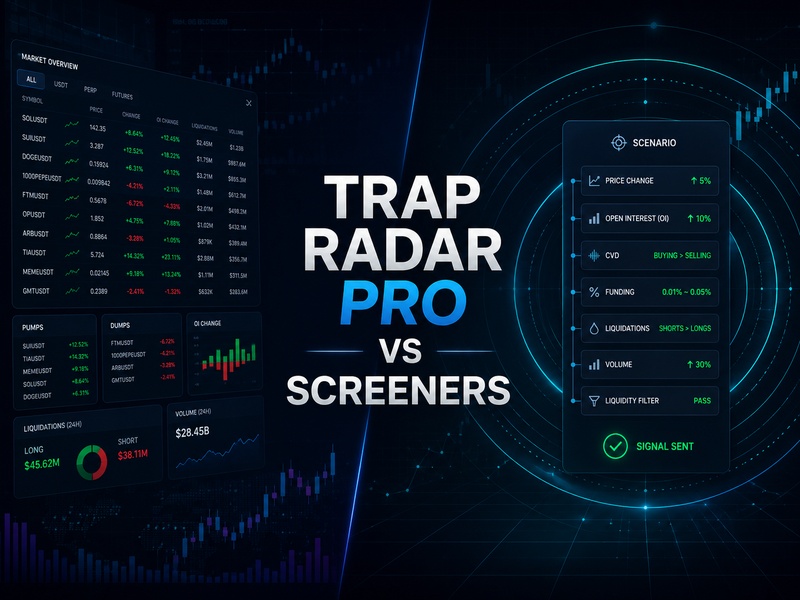
Trap Radar PRO works through a different process. We define the scenario conditions in advance, and the Radar waits for those conditions to appear in the market. Screeners give a broad market overview. Trap Radar PRO monitors a specific combination of data.
How screeners work
Screeners show market activity in real time. They help traders quickly find coins where movement, volume, open interest, or liquidations have appeared.
A screener can highlight:
- A pump over a short window.
- A dump over a short window.
- Rising open interest (OI).
- Falling open interest.
- Large long liquidations.
- Large short liquidations.
- Abnormal volume.
After that, the trader opens the chart and reads the setup manually. Structure, CVD, OI, funding, liquidations, volume, and the higher timeframe still need to be checked. For an experienced trader, this is a normal workflow. For a beginner, the load is higher because the decision has to be built quickly.
How Trap Radar PRO works
Trap Radar PRO monitors the market through predefined conditions. First, we describe the scenario. Then the Radar waits for the parameters to match and sends a signal to Telegram or the personal dashboard.
A scenario can include:
- Price change over a selected window.
- Rising or falling open interest (OI).
- CVD through the delta of aggressive buying and selling.
- Funding within a selected range.
- Long or short liquidations.
- Volume change.
- Liquidity and coin-type filters.
This moves part of the work before the signal. The trader decides in advance what market structure is worth tracking, and the Radar monitors it across the market.
How the workflow differs
A crypto screeners helps find an event quickly. Trap Radar PRO helps wait for a scenario.
With a screener, the trader often works after the move has already appeared. The coin has pumped, dumped, shown an OI spike, or printed liquidations. The next step is to decide whether there is still a workable zone.
With Trap Radar PRO, the trader sets the conditions in advance. The signal arrives when the market reaches the selected model. This reduces random decisions and keeps the process closer to a written plan.
The workload is different:
- A screener gives a broad flow of market events.
- Trap Radar PRO tracks a selected combination of conditions.
- A screener shows activity faster.
- Trap Radar PRO is better suited for predefined scenarios.
- A screener requires more manual filtering in the moment.
- Trap Radar PRO requires cleaner setup before the signal.
Both tools belong in the same system. Screeners give market overview, while the Radar helps keep focus on specific models.
Why Trap Radar PRO can be easier for beginners
A beginner often struggles to decide which data matters most right now. A pump can be the start of a move or the late phase of it. A dump can be continuation or a liquidation rebound zone. Rising OI can confirm the move or show that the crowd is becoming overloaded.
Trap Radar PRO makes the process more structured through a predefined scenario:
- Choose one market model.
- Set conditions for price, OI, CVD, funding, liquidations, and volume.
- Wait for the signal.
- Open the chart.
- Check the context.
- Make the decision by the plan.
- Evaluate the result across a series of signals.
This approach reduces impulse. The trader reacts less to every sharp move and works more often with a prepared situation.
Example: pump exhaustion
A coin moves sharply higher. The screener shows a pump, rising OI, a volume spike, or short liquidations. That is a valid reason to open the chart and check what is happening.
Trap Radar PRO allows the trader to define a more precise model in advance:
- Price has increased over the selected window.
- Open interest (OI) has increased.
- Funding has moved into the selected zone.
- CVD no longer confirms buyer strength.
- Volume starts to fade after the spike.
- The coin passes the liquidity filter.
- The Radar sends a signal.
The trader receives a situation that has already passed the selected conditions, rather than a random ticker from the general activity flow. The next step is chart review and execution by the trader’s own system.
Example: liquidation rebound
A screener can quickly show a sharp dump and large long liquidations. This helps find a coin where the market has produced a strong reaction.
Trap Radar PRO can wait for a narrower combination:
- Price has dropped sharply.
- Long liquidations have appeared.
- OI has decreased after the flush.
- Volume has expanded sharply.
- CVD shows seller pressure.
- Price stops making a new local low.
- The Radar highlights the situation for manual review.
The screener shows the event quickly. The Radar helps track the set of conditions inside that event.
How to combine screeners and Trap Radar PRO
The stronger workflow comes from separating the tasks.
Screeners are useful for market overview:
- Where the market is moving now.
- Where OI has increased.
- Where liquidations have appeared.
- Where volume has expanded.
- Which coins deserve attention.
Trap Radar PRO is useful for scenario monitoring:
- Pump exhaustion.
- Dump after liquidations.
- Short squeeze conditions.
- Overheated funding.
- Price, CVD, and OI imbalance.
- Scenarios for manual entry or automated execution through API/bot.
In this workflow, screeners give broad market coverage, while Trap Radar PRO monitors precise conditions.
Common mistakes
A screener should not be treated as a complete trade. It shows activity, while the trade decision comes after chart and context review.
A Trap Radar PRO scenario should not be too broad. When the conditions are too loose, the trader receives too many signals and loses the benefit of strict filtering.
Different market models should be separated. Pump exhaustion, liquidation rebound, and short squeeze conditions require different rules.
Liquidity filters matter. On thin coins, data is harder to read, and price movement can be sharp and unstable.
Settings should not be changed after every single trade. A scenario is evaluated across a series of signals, not by one result.
How to use it in the workflow
We use screeners and Trap Radar PRO for different tasks.
Screeners help traders see market activity quickly. They are useful for first-level coin selection and manual chart review.
Trap Radar PRO helps monitor prepared conditions. It watches the market 24/7 and sends a signal when the parameters match.
A clean workflow:
- Use screeners to read broad market activity.
- Use Trap Radar PRO to monitor precise scenarios.
- Open the chart after the signal.
- Check structure, volume, CVD, OI, funding, and liquidations.
- Make the decision manually or through a configured execution setup.
- Evaluate the result across a series of signals.
The screener helps see the market wider. Trap Radar PRO helps keep predefined scenarios from being missed.
FAQ
Does Trap Radar PRO replace screeners?
No. Screeners and Trap Radar PRO solve different tasks. Screeners show market activity, while the Radar waits for a predefined combination of conditions.
Why can Trap Radar PRO be easier for beginners?
Because the beginner defines the scenario in advance and receives a signal only when the conditions match. This reduces random decisions in the moment.
When are screeners more useful?
Screeners are useful for a fast market overview: pumps, dumps, OI, liquidations, volume, and other active events.
When is Trap Radar PRO more useful?
Trap Radar PRO is useful when the trader wants to wait for a specific model: pump exhaustion, liquidation rebound, short squeeze conditions, or an imbalance between price, CVD, and OI.
Can automated execution be connected?
Yes, if the setup is configured through API/bot. The signal remains part of the system, while risk control and scenario review remain mandatory.
Conclusion
Screeners and Trap Radar PRO work inside one market monitoring system.
Screeners help traders quickly find activity: pumps, dumps, OI, liquidations, and volume. They are useful for market overview and manual coin selection.
Trap Radar PRO helps define a scenario in advance and wait for the conditions to match. For a beginner, this format can be easier because it reduces in-the-moment noise and moves the work into a structured process.
The working combination is clear: screeners show where the market is moving, Trap Radar PRO monitors predefined conditions, and the trader makes the decision after checking the chart and risk.
Risk disclaimer
Signals and scenarios do not guarantee results.
Any trading system requires testing, risk control, and evaluation across a series of trades.
This material is educational and is not investment advice.