
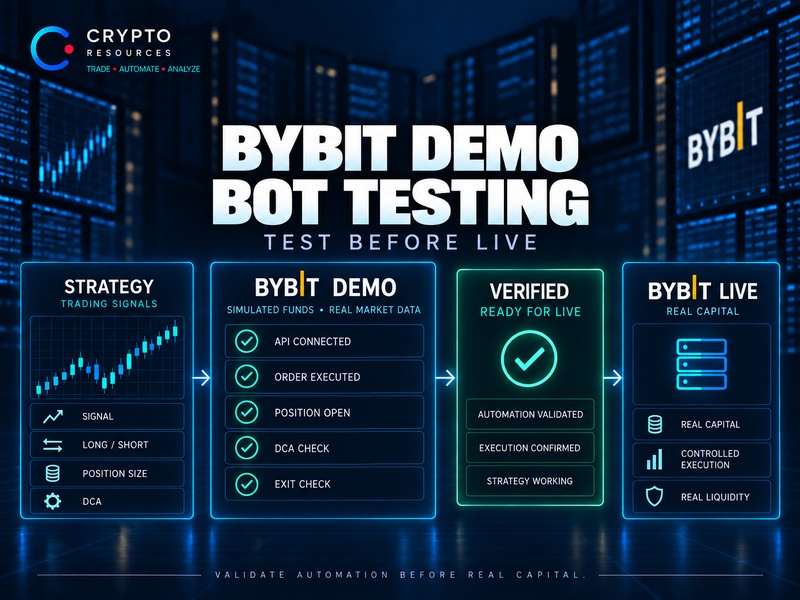
Before running a trading bot on a live account, you need to test more than the strategy itself.
The signal can be right while the execution is wrong. The bot may open the wrong size, use the wrong direction, miss a DCA entry, send a duplicate order or close the position incorrectly.
That is exactly what Bybit Demo is useful for.
Demo lets you run automated trading on Bybit market data without risking real capital. Through the separate Demo API, the bot can open positions, manage orders and run through the core trading cycle using simulated funds.
The goal is not to prove that the strategy is profitable. It is to verify that the bot executes it exactly as intended.
Demo Trading and Backtesting Test Different Things
A backtest shows how a strategy would have behaved on historical data.
Demo shows what the bot does now when it receives a market signal and has to execute the trade in real time.
Historical testing can help measure signal frequency, drawdowns, result distribution and performance across different market conditions.
What it does not test is the full execution chain:
signal → filters → API → order → position → management → exit.
That is where implementation problems start to matter.
The strategy may identify the correct Short while the bot opens the wrong size. A repeat signal may create a new position instead of triggering DCA. After averaging, the exit logic may still use the old average entry.
In those cases, the trading idea is not necessarily the problem. The execution is.
How Bybit Demo Differs From Testnet
Bybit treats Demo Trading and Testnet as separate environments.
Testnet is a standalone testing network with its own market and infrastructure.
Demo uses Mainnet market data, while trades are executed with simulated funds and never enter the real order book.
For trading bot testing, that makes Demo a useful step between historical testing and Live.
The strategy reacts to real market movement, while the execution layer can be tested without putting capital at risk.
But Demo does not reproduce Live fills perfectly.
Because Demo orders do not interact with the real order book, it cannot fully show actual slippage, the impact of larger orders or how a trade behaves in thin liquidity.
Demo is therefore well suited to answering:
does the bot behave correctly?
It is much less useful for answering:
how will this exact order fill in the live market?
Test the API and Basic Execution First
The first Demo run should not be about PnL.
Start by checking whether the bot interacts with Bybit correctly.
Demo Trading uses a separate account and separate API keys. The bot must be connected to the Demo environment rather than Real or Testnet.
Then check the basic execution cycle:
- receiving the required market data;
- reading balance and open positions;
- creating an order;
- confirming execution;
- displaying the position correctly;
- modifying or cancelling an order;
- closing the full position.
Profitability does not matter at this stage.
If the bot is supposed to open a 20 USDT position, the first question is whether it actually opened 20 USDT on the correct instrument and in the correct direction.
Test Long and Short Separately
This matters most with futures bots.
A working Long does not automatically mean the Short side is configured correctly.
The two directions may use different signals, filters, position sizes, DCA rules, averaging logic and exits.
Opposite orders also behave differently depending on the Bybit position mode being used.
So Demo should test both paths separately:
Long signal → Long position → management → close
and
Short signal → Short position → management → close.
If the bot uses Hedge Mode, add another scenario:
Long already open → Short signal appears → both positions remain independent.
That checks both the strategy logic and the position mode itself.
Test the Maximum Position, Not Just the First Entry
The first order often works exactly as expected.
Problems tend to appear later.
If the strategy uses DCA or averaging, the final position can become several times larger than the initial entry.
Demo should therefore include the full allowed scenario:
first entry → all permitted DCA entries → allowed averaging → maximum position size.
Then check:
- whether the final position size matches the settings;
- whether the position limit is respected;
- whether the average entry is recalculated correctly;
- whether the expected leverage remains in place;
- whether available margin is sufficient for the full scenario;
- whether further entries are blocked once the limit is reached.
The maximum position shows the real size of the risk.
The first order alone does not.
A Repeat Signal Should Do Exactly What It Is Supposed to Do
Repeat signals need their own test.
Suppose a position is already open and the strategy triggers again on the same asset.
Depending on the configuration, the bot may:
- ignore the signal;
- trigger DCA;
- add another order;
- skip the entry because of the cooldown;
- stop because the position limit has been reached.
The expected behavior should be clear before the test starts.
In Trap Radar Bot, for example, a repeat signal from the same Radar on the same asset and in the same direction can trigger a fixed DCA entry. The cooldown between signals and maximum position size still apply.
It is also worth testing the case where new entries are disabled while management of an existing position remains active.
The bot needs to distinguish between opening a new trade and managing an existing position.
The Test Is Not Finished Until the Position Is Fully Closed
An open position does not prove that the bot works correctly.
You need to run the entire cycle:
signal → entry → position changes → exit → no remaining position.
If Take Profit is enabled, verify that it actually executes.
If Trailing is used, check how it behaves as price moves.
After DCA or averaging changes the average entry, the exit logic should reflect the updated position state.
Once the trade is closed, the bot should recognize that the position is finished and move cleanly to the next setup.
Also check for small leftover positions and cases where the system continues to treat a closed trade as active.
Demo Does Not Replace Live
Even a perfectly working Demo setup does not reproduce the live market completely.
The biggest difference is execution.
In Live trading, fills depend on:
- liquidity;
- position size;
- spread;
- speed of the market move;
- slippage;
- partial fills;
- delay between signal and actual fill.
On a liquid pair with a small order, the difference may be minor.
On a thin altcoin during a sharp move, it can be significant.
That is why Demo results should not be carried over to Live one for one.
Demo tests the logic and technical behavior of the system. Live adds real liquidity and real execution costs.
Move From Demo to Live Without Changing the Logic
It is easy to undo the value of testing by changing too much at once: increasing leverage, position size and the number of active strategies immediately after Demo.
At that point, the Live system is no longer the one that was tested.
A cleaner transition keeps the trading logic intact and changes only the capital scale:
same strategy → same filters → same position rules → small real size.
That makes it easier to compare Demo and Live on execution quality.
Pay close attention to slippage, fees, funding and less liquid markets.
If Live behaves materially differently from Demo, find the reason first instead of trying to compensate with more risk.
How Bybit Demo Is Used in Crypto Resources
For Crypto Resources trading bots, Bybit Demo is connected separately from the live account.
The user creates a Demo API key and connects it to the bot instead of the Real API.
The strategy can then run through the same core cycle:
signal → condition checks → order → position → management → exit.
With ST-Bot, this allows users to verify how trades are opened and managed under its strategy.
With Trap Radar Bot, Demo can be used to test Long and Short separately, repeat signals, DCA, position limits and the Radar configuration itself.
The point is not to build an attractive equity curve on simulated funds.
It is to confirm that the exact bot configuration behaves the way the trader expects it to behave.
What Actually Needs to Be Checked Before Going Live
A few profitable Demo trades say very little about whether the automation is reliable.
It is more useful to test the trading system where something can go wrong:
What happens after a repeat signal?
What happens if the opposite side is already open?
Does DCA stop at the configured limit?
Is the average entry recalculated correctly?
Does the position close completely?
Will the bot skip a trade that should not be opened?
If those scenarios behave as expected, Demo has done its job.
Before going live, the goal is not to prove that the bot can make money on simulated funds. It is to verify that it can execute the full trading model correctly from the first signal to the final position close.
Risk Disclaimer
This material is for informational purposes only and does not constitute investment advice. Results from Demo Trading, backtesting or other forms of testing do not guarantee similar results with real capital. Automated trading, futures and leverage involve risk.