Prepare the account
Use the main Bybit account or a separate subaccount to isolate the balance and positions of the automated strategy.
View ready-made bots →Run Bybit futures strategies on your computer or VPS. Pay the service fee only after a trade closes in profit.
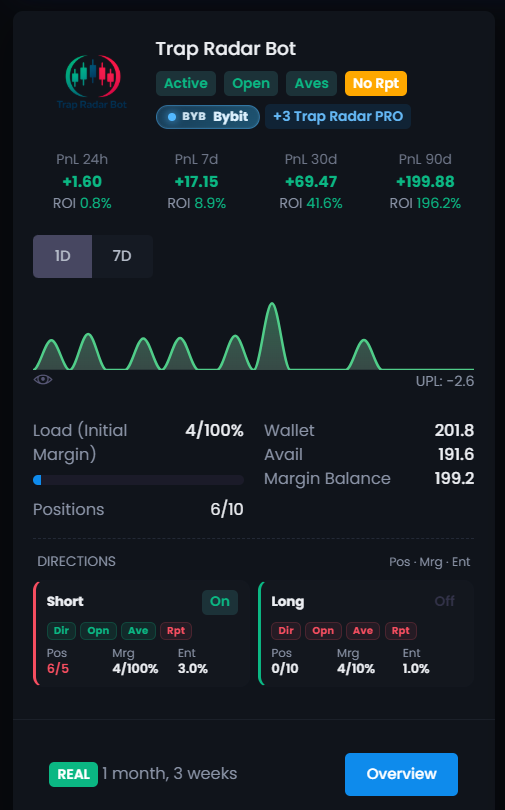
This is a cryptocurrency bot specifically for Bybit futures. Install the app, connect the exchange through the API, and set the strategy rules. The deposit stays in your exchange account.
Use the main Bybit account or a separate subaccount to isolate the balance and positions of the automated strategy.
View ready-made bots →Allow account read access and contract trading. Withdrawal permission is not required to execute trades.
Connection guide →Choose a strategy, set the entry size, position cap, and exit conditions. DCA exists only in Trap Radar Bot and Trap Radar PRO.
Open the bot catalog →The algorithm does not make arbitrary decisions: it checks the conditions you set and performs only the sequence defined by the chosen strategy and your settings.
A trade opens only after the strategy conditions are met. The initial order size is capped in advance.
ENTRY RULESIn Trap Radar Bot and Trap Radar PRO, extra DCA orders are filled by a set plan and within the size you chose.
DCA · POSITION CAPThe exit follows the strategy rules: fixed targets, protective conditions, trailing, or Smart Take.
EXIT LOGICBefore launch, choose the entry size, position cap, and exit conditions. The app follows those settings, and trades can be tracked in the statistics. Futures, especially with leverage, still carry the risk of loss.
Ready-made bots differ in direction, timeframe, and the set of signals. Before launch, study the rules of the specific strategy and adapt the limits to your account.
A scenario for short trades after overheated impulse moves on the futures market.
The execution app runs on your machine and does not require moving the deposit to a third-party service.
Trades from a combination of OI, CVD, liquidations, volume, funding, and other market metrics.
Automation disciplines execution, but it does not replace the choice of acceptable risk. The key limits are set before the start, and the program follows them during the trade.
The screenshots show statistics for one public futures bot for Bybit created by a platform user. It can be downloaded and started in demo mode in one click; the results belong only to that bot and that period.
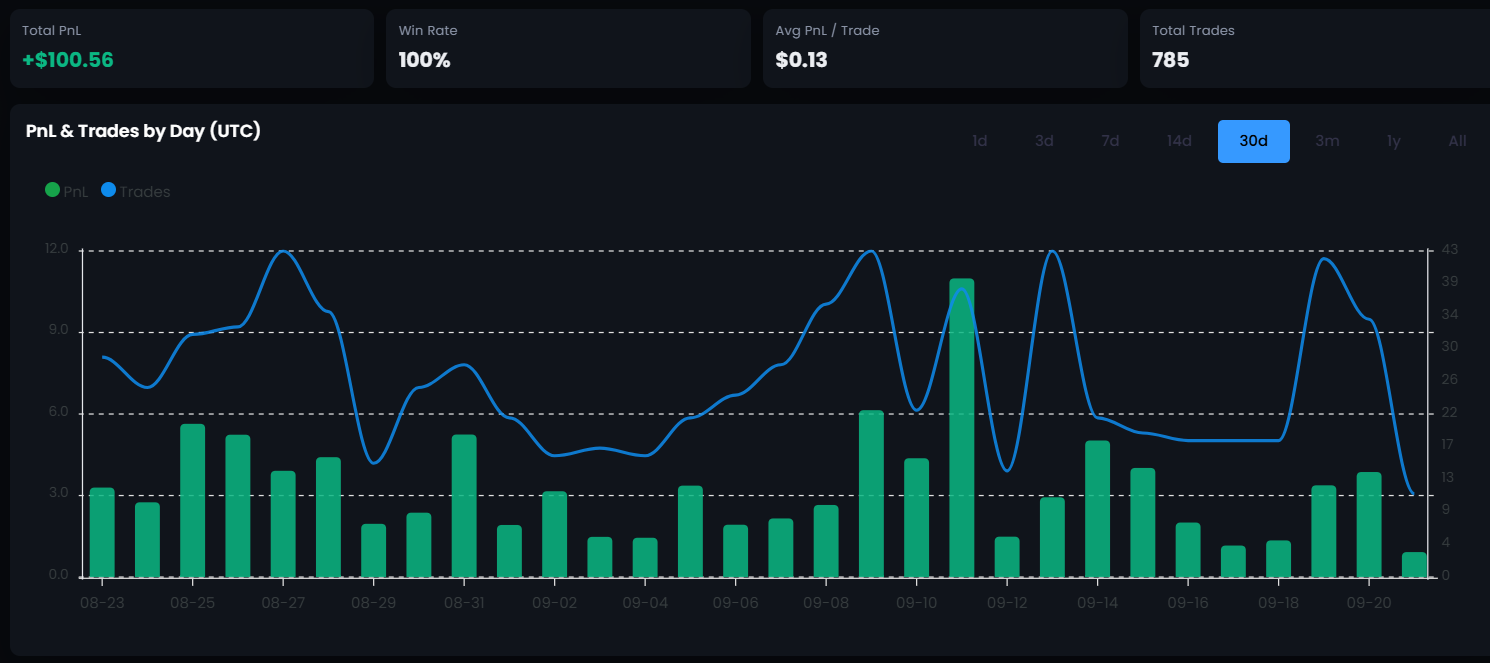
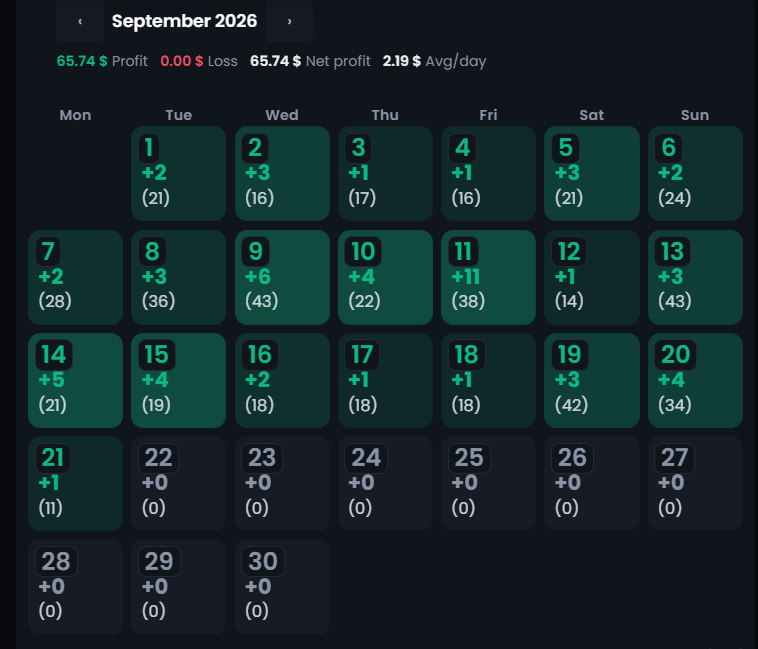
Check the scenario in demo mode first. On a live account, the service fee is charged only after a trade with positive net PnL.
Check the interface and the logic of ready-made strategies without connecting real capital.
Connect Bybit and pay the service fee only after a trade closes in profit.
It connects to the account through the API and executes a futures strategy long or short by conditions the user chooses. The bot automates orders, but it does not forecast the market and does not guarantee a result.
Yes. The direction depends on the strategy: ST-Bot is built for short scenarios, and Trap Radar Bot lets you configure long and short separately.
Before launch you set the first entry, the position cap, and the exit rules. DCA is available only in Trap Radar Bot and Trap Radar PRO. Leverage and margin mode are set by the user in the exchange account.
No. You need account data read access and permission to trade contracts. Withdrawal access does not need to be enabled for the bot.
The app runs on Windows, Linux, or a VPS. For the strategy to keep running, the device has to stay on and connected to the internet.
Yes. Demo mode lets you study the interface and settings without connecting real capital.
No. The algorithm executes the rules you set, but futures trading with leverage carries the risk of loss and liquidation.
Choose a scenario, set position limits, and study the execution flow without connecting real capital.