
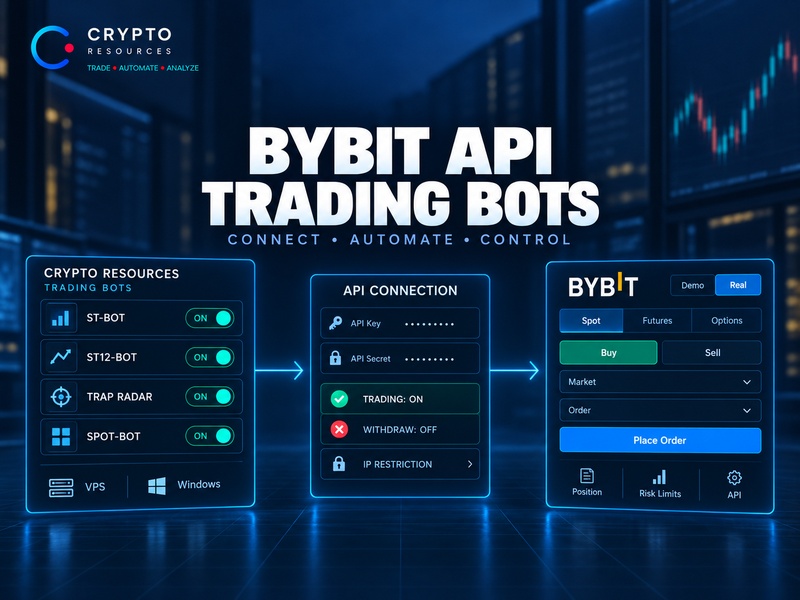
Crypto Resources trading bots connect to Bybit through API access. The bot never needs your Bybit login or password: instead, you create a separate API key and grant only the trading permissions required for the bot to operate.
Your funds remain on your Bybit account. The bot does not need withdrawal permission, and it should not be enabled.
But API access is only one part of the automation stack. Before launch, you still need to choose between Demo and Real, configure the strategy, define position size and risk limits, and run the Crypto Resources execution app on a computer or VPS.
The result is not a “bot running inside Bybit,” but a separate trading system where Crypto Resources handles the strategy logic while Bybit handles exchange-side order execution.
How Crypto Resources Interacts With Bybit
The overall flow is straightforward:
trading logic → Crypto Resources bot → Bybit API → order → exchange.
The API does not decide when to enter the market or how much risk to take. It simply passes the instructions generated by the trading bot to Bybit.
Different bots use different logic.
ST-Bot runs its own futures strategy, ST12-Bot operates on a longer time horizon, Spot-Bot trades the spot market, while Trap Radar Bot automates execution around conditions defined in Trap Radar. For a side-by-side overview, see trading bots for Bybit.
A Trap Radar setup can combine OI, CVD, liquidations, volume, funding, RSI, VWAP and other parameters. Once the required conditions are met, the bot still checks direction, position size, DCA settings and exit rules before sending an order to Bybit.
That is why a working API connection does not mean the system is ready for live trading. The API provides access to execution; strategy logic and risk controls sit above it.
Demo and Real Should Be Separated From the Start
In Crypto Resources, a bot can connect to Bybit in either Demo or Real mode.
Demo is used to test the strategy and execution logic with virtual funds. It requires a separate API key created specifically inside Bybit Demo Trading.
This distinction matters: Bybit Demo is a separate environment with its own API credentials. For the standard Crypto Resources Demo workflow, there is no need to use Bybit Testnet.
A Real connection, by contrast, uses the live Bybit trading account and real capital. It therefore requires a separate Live API key.
Keeping the two environments separate improves both control and safety. A test configuration should never accidentally gain access to live funds.
The normal progression is simple:
Demo → validate strategy and execution → create a separate Real bot → start with small live exposure.
For a new strategy, this is far more sensible than going live just because the API status shows as connected.
The API Key Should Only Have the Permissions the Bot Needs
A Bybit API key is created through the API Management section on the exchange website. Newly registered accounts may temporarily be unable to create API keys during the first 48 hours.
The main rule is to keep permissions as narrow as possible.
For futures bots, the key needs trading permissions that allow access to orders and positions. In Bybit V5, these are associated with Contract Trade / Order / Position.
Spot-Bot requires the corresponding Spot trading access.
Withdraw should remain disabled.
For normal trading operations, the bot only needs to be able to:
- read the required account data;
- view open positions;
- create and cancel orders;
- manage positions according to the strategy.
Withdrawal access is not part of that workflow.
This does not make live trading risk-free — a trading API key can still open real positions. But it prevents the external application from receiving permissions it does not need.
IP Restrictions and API Secret Security
Bybit allows an API key to be restricted to specific IP addresses.
For Crypto Resources, this depends directly on where the execution app is running.
If the bot runs on a VPS with a static IP, the key can be restricted to that server address. Requests coming from other IPs should then be rejected.
A home computer can be less convenient. If the internet provider regularly changes the public IP, a strict IP restriction may cause the bot to lose access to Bybit after the address changes.
API status and expiration should also be monitored. Crypto Resources includes a Bybit API key and expiration check so connection issues can be identified before they interrupt trading.
The API Secret should be treated like a password.
Do not post it in open chats, include it in public support tickets or enter it into third-party websites claiming to “check” an API connection. If there is any reason to believe the credentials may have been exposed, creating a new connection is the safer option.
Where the Trading Bot Actually Runs
Once the bot has been created and configured in the dashboard, the Crypto Resources execution app must be running.
It can operate:
on Windows — while the computer remains powered on and connected to the internet;
on Linux/VPS — for continuous 24/7 operation.
This is a key difference between an external bot and the exchange's built-in automation tools.
The bot configuration may be stored in the Crypto Resources account, but the execution process still has to run somewhere. If the application stops, the bot's new trading logic stops with it.
For round-the-clock automation, a VPS is therefore usually more practical than a home PC: the server stays online, offers a stable connection and can use a static IP for API restrictions.
From the Crypto Resources dashboard, the user can monitor bot status, trades, PnL and exchange fees.
The API Does Not Define Trading Risk
Once the API connection is working, the more important part begins: configuring the trading bot itself.
The API does not decide position size, when to use DCA or where to take profit. Those rules belong to the trading system.
Depending on the bot, the configuration can include:
- initial position size;
- maximum position size;
- DCA or averaging;
- Take Profit;
- Smart Take;
- Trailing Stop;
- additional entry and exit conditions.
In Trap Radar Bot, Long and Short can be configured independently. Each direction can use its own conditions, sizing, DCA rules and exits.
If the same Radar triggers again, the bot can add DCA to an existing position when that feature is enabled and the maximum position limit has not been reached.
This is why disabling withdrawal permission protects only one layer of the system. Actual trading risk is determined by what the bot is allowed to do with the capital available to it.
An API connection can be configured perfectly and still produce excessive risk if the initial order size is too large, leverage is too high or averaging is left effectively unrestricted.
What to Validate in Demo Before Going Real
Demo is useful not because one simulated trade proves anything, but because it allows the entire workflow to be checked.
The key questions are:
- Are entries appearing when expected?
- Is position size being calculated correctly?
- Is the maximum position limit respected?
- Do DCA and averaging behave as configured?
- Do Take Profit, Smart Take and Trailing work correctly?
- Does the bot manage and close positions as intended?
This tests execution as well as the trading signal itself.
Demo should not be treated as a perfect replica of live execution. Real-market liquidity, actual fill prices and slippage can differ.
A successful Demo period therefore should not lead directly to full-size live exposure. The next stage is better handled through a separate Real connection with a small initial position size.
API Security and Capital Management Are Different Layers
These two areas are easy to confuse in automated trading.
API security determines which actions an external system is allowed to perform on the account.
That includes:
- keeping Withdraw disabled;
- granting only the required trading permissions;
- protecting the API Secret;
- using IP restrictions where the infrastructure allows it;
- monitoring API status and expiration.
Bot configuration determines how much trading risk the system can create within those permissions.
That includes initial position size, maximum exposure, leverage, DCA, averaging and exit rules.
An API key without withdrawal permission cannot withdraw assets from the exchange. But if it has trading permissions, it can still open real positions.
Both layers therefore need their own limits.
What a Full Crypto Resources Setup on Bybit Looks Like
The complete workflow can be summarized as:
Bybit Demo → API key without Withdraw → Crypto Resources → select and configure bot → Windows/VPS → validate trades → separate Real connection → small live exposure → scaling.
The user does not need to program against the Bybit API or build trading requests manually.
The API remains the controlled channel between the running Crypto Resources bot and the Bybit account.
Funds remain on Bybit. Trading logic, sizing and limits are configured inside the specific bot. Execution happens automatically through the trading permissions granted to the API key.
That separation keeps the system clear: Crypto Resources handles the strategy logic and execution workflow, Bybit provides the exchange infrastructure and processes the orders, while the user retains control over access and risk.
Risk Disclaimer
This material is for informational purposes only and does not constitute investment advice. Automated trading, futures and leverage involve risk. Before using a live account, independently review the API settings, trading strategy and acceptable position size.