Detects the impulse
The bot watches altcoins and, on the timeframes you choose, flags moves that match the growth threshold you set.
Which filters are there →ST Bot watches sharp impulse moves, checks the filters you set, and opens a futures short after the signal is confirmed. You set the position limits and the exit conditions.
A sharp rise is not itself an entry command. ST Bot first records the impulse, then applies filters and waits for the chosen strategy's conditions to confirm.
The bot watches altcoins and, on the timeframes you choose, flags moves that match the growth threshold you set.
Which filters are there →It checks volume, liquidity, the daily move, funding, and the other limits in the configuration.
See the selection →The position opens after the signal is confirmed and is managed by the exit rules set in advance.
View the limits →Filters exist to remove part of the market noise and to avoid opening a position only because the price jumped. You choose the exact values for your configuration.
The growth threshold, timeframe, candle body, and allowed wick length describe the kind of move you want.
PUMP DETECTIONMinimum turnover, liquidity, the 24-hour change, and the allowed coin list limit the trading pool.
MARKET FILTERSAfter a pump is detected, the bot checks the conditions of a likely reversal and only then allows a short entry.
ENTRY CONFIRMATIONA pump can continue after the signal appears. That is why the entry size, the number of positions open at once, the allowed margin, and the exit conditions are set before ST Bot starts.
In one app you can create several bots. Coins, impulse parameters, filters, position size, and exit rules are chosen separately for each.
Choose another user's configuration in the dashboard and study its settings and statistics before you start.
Set the impulse thresholds, admission filters, position limits, and management conditions for your scenario.
Split trading scenarios by coin sets and settings instead of putting every behavior into one configuration.
ST Bot does not make the investment decision for you. It continuously checks conditions set in advance and executes the trading scenario without you watching every coin.
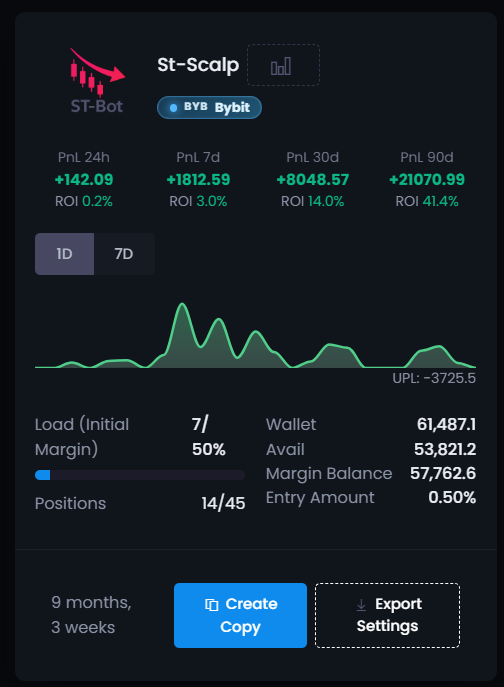
Below is the statistics of one public ST Bot created by a platform user. After you register, the bot is free in the ready-made catalog — you can copy it and start it in one click.
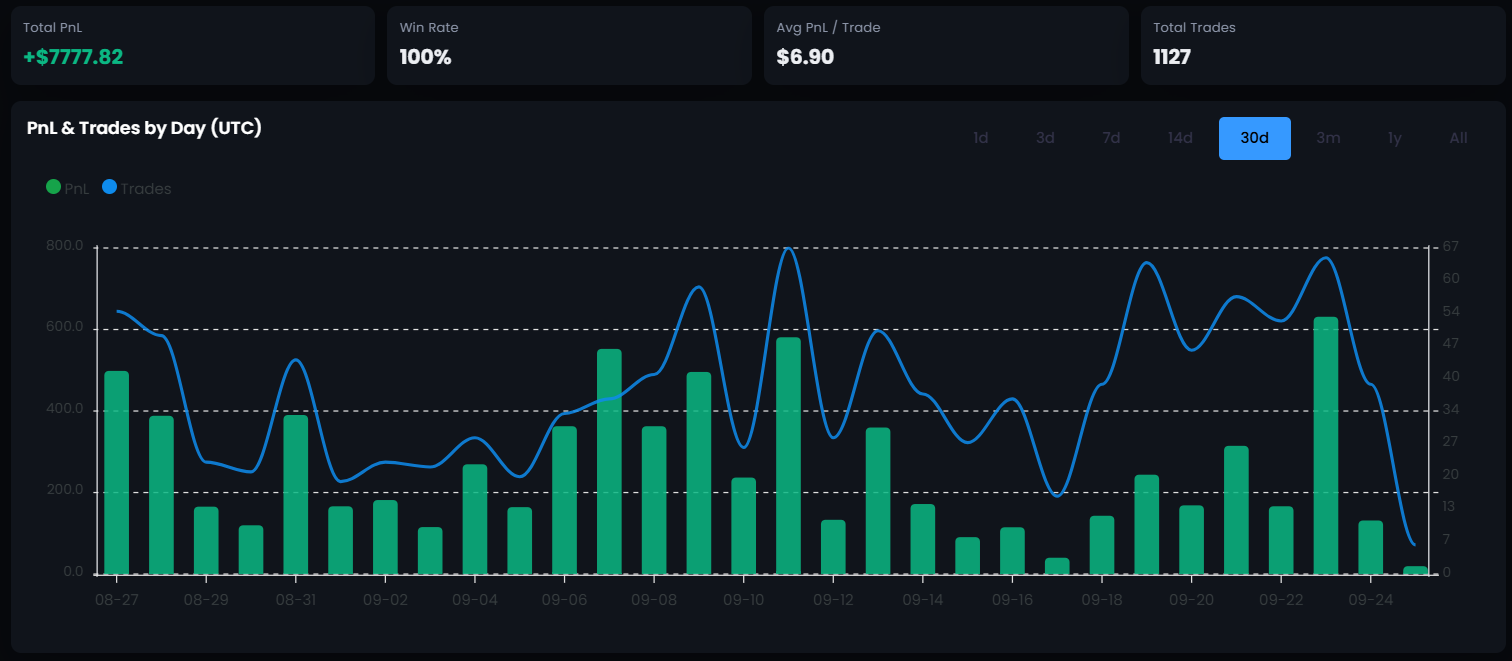
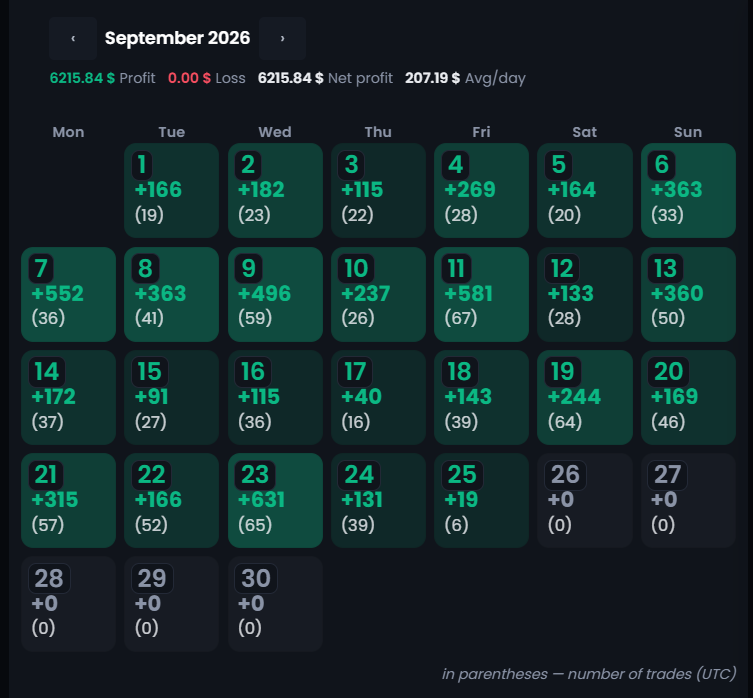
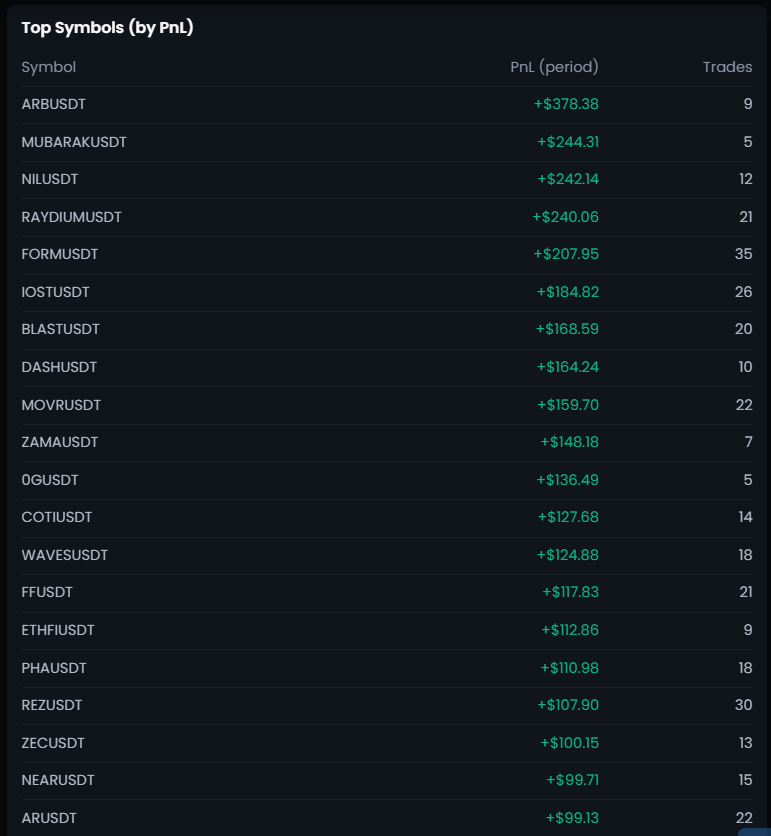
Study the ready-made bots in the dashboard. On a live account, the service fee is charged only after a trade closes with positive PnL.
Look at ready-made ST Bot configurations, the interface, the settings, and the available statistics before a live launch.
There is no required monthly subscription for the trading bot.
It is a futures trading bot that watches sharp impulse moves in cryptocurrencies and opens a short after the filters you set are passed and the signal is confirmed.
No. Detecting the impulse is only the first step. The coin has to pass the configuration filters and the entry-confirmation conditions.
You set the impulse and filter parameters, the coin list, the entry size, the position cap, the maximum number of open trades, and the exit rules.
No. In Crypto Resources, DCA is available only in Trap Radar Bot and Trap Radar PRO.
Crypto Resources trading bots work with Bybit and Binance. Check the exchange and the available instruments in the configuration you choose.
The app runs on your computer or a VPS. For round-the-clock operation the machine has to stay on and connected to the internet.
No. The bot automates condition checks and execution of the trading scenario, but it does not guarantee a result. A pump can continue after entry, and futures trading carries the risk of loss.
Study the public configurations, set your own limits, and run separate trading scenarios on a PC or VPS.