Define the scenario you need
Choose the automation task: spot trading, a futures scenario, or conditions based on market metrics.
Crypto Resources scenarios →Choose ready-made crypto trading bots and run them on your own computer or VPS — without a required subscription payment every month.
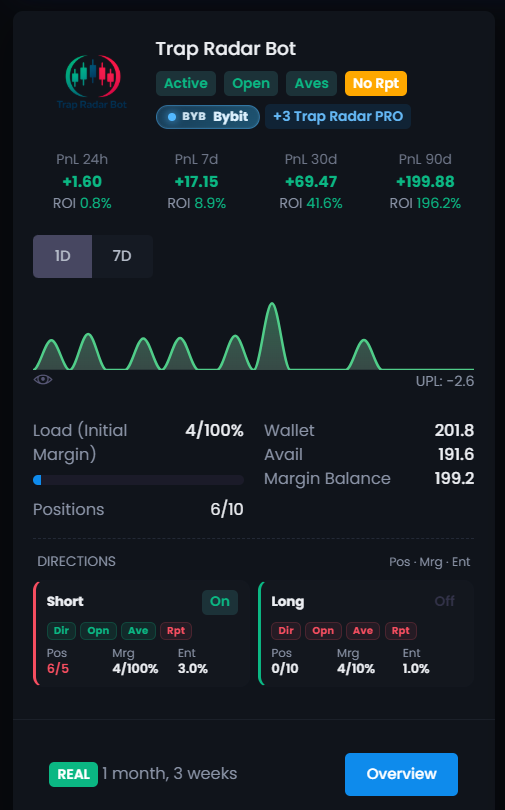
First decide which trading scenario you need. Then choose a suitable public bot in Crypto Resources or create your own with unique settings. Before a live launch, set the limits and review the parameters.
Choose the automation task: spot trading, a futures scenario, or conditions based on market metrics.
Crypto Resources scenarios →Compare ready-made configurations by strategy type, time in operation, and statistics. Set your own limits before launch.
Open the catalog →Install the app on Windows, Linux, or a VPS and connect Bybit or Binance through a trade API without withdrawal permission.
Go to the guides →Bitsgap uses a subscription and runs bots in the cloud. Crypto Resources removes the required monthly payment: you choose a ready-made strategy and run the app on your own PC or VPS.
There is no required monthly payment for access to the trading bots. The service fee is tied to a positive result on a closed trade.
NO MONTHLY FEEThe execution app runs on your computer or VPS. You control when it is available and when it starts.
SELF-HOSTEDThe catalog lets you study the statistics of ready-made bots, copy a configuration that fits, and set your own limits.
READY BOTSCrypto Resources is a standalone alternative with ready-made user strategies, local execution, and pricing without a required monthly subscription. You choose a specific bot, set the limits, and run it on your own machine.
Choose a scenario for spot, futures, or market metrics, study a public bot's statistics, and launch your own copy with the limits you set.
Study bots that users already run and create your own copy of the configuration you choose.
Choose Spot Bot, ST Bot, or Trap Radar Bot depending on the market and the automation logic.
One app can run several bots at once, each with different coins, settings, and limits.
The key difference is what the user pays for and when. Crypto Resources has no required monthly payment for access to the bots.
Before you create your own copy, open a public bot's card: look at how long it has run, its closed trades, and the results by period. Below is one user scenario, not a forecast.
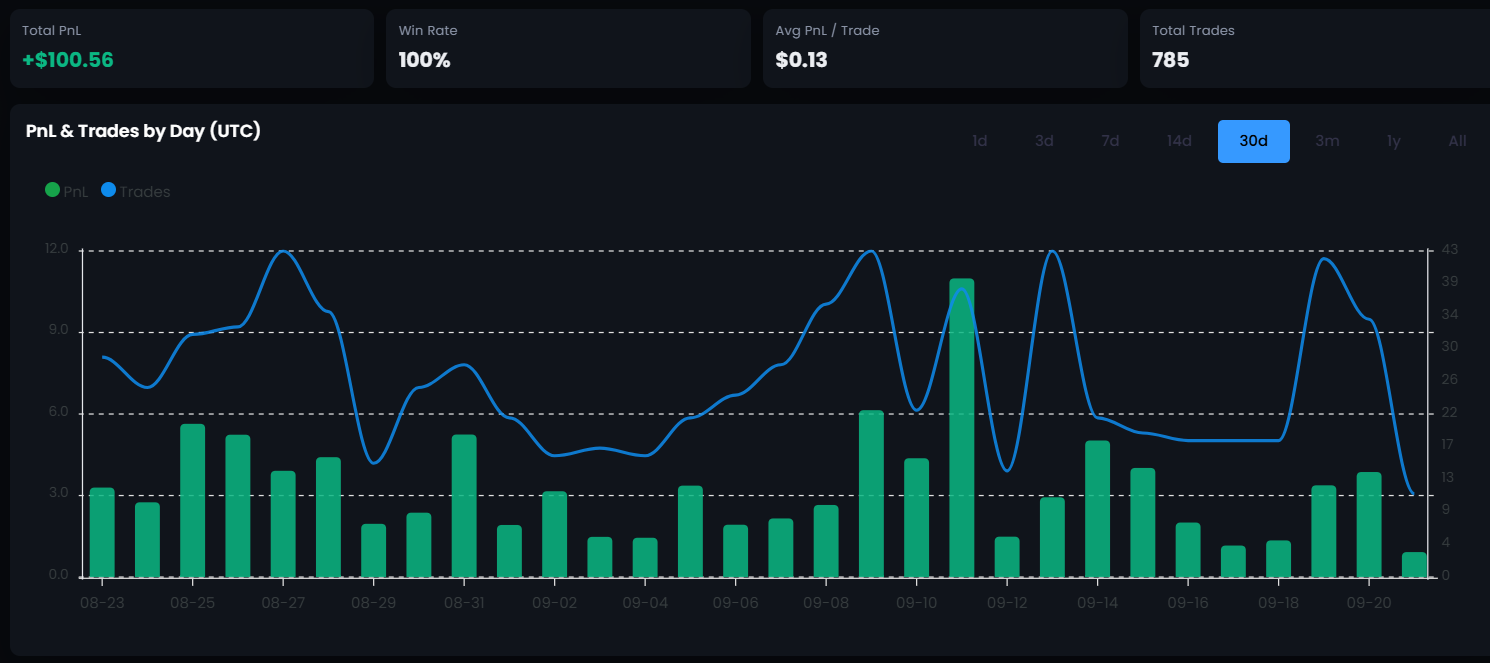
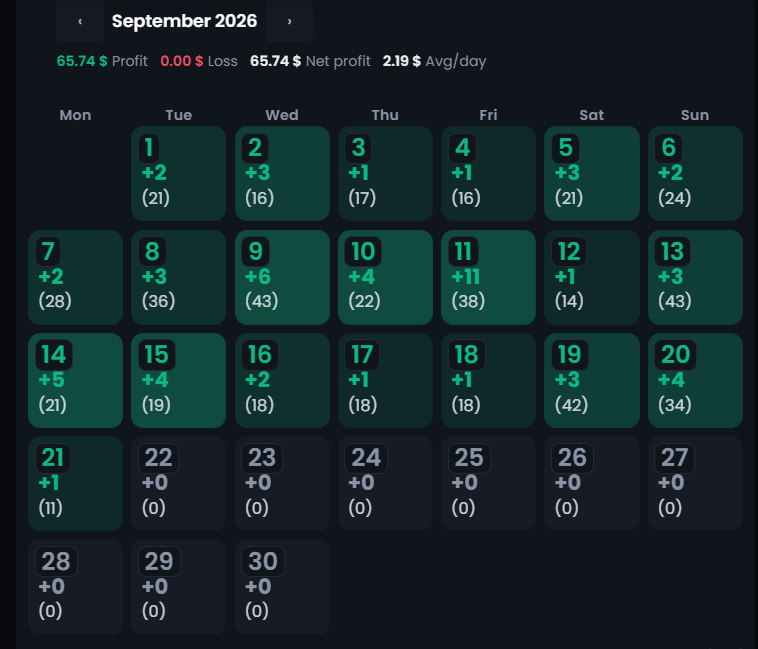
Unlike a subscription, access to the trading bots does not require a fixed monthly payment. In live mode, the fee depends on a positive trade result.
Check the interface and the logic of ready-made strategies without connecting real capital.
Connect Bybit or Binance and pay the service fee only after a trade closes in profit.
The main differences are no monthly subscription for the bots, a service fee only after a closed trade with a positive result, and an app that runs on your PC or VPS.
No. Crypto Resources is a separate platform with ready-made public bots, local execution, and pricing without a required monthly subscription. Before you switch, check whether the trading scenario you choose fits your task.
Bitsgap charges for access by subscription. Crypto Resources has no required monthly subscription for the bots: in live mode the service fee is charged only on the positive net PnL of a closed trade.
No. The bot needs account-data access and permission to trade contracts. Withdrawal access does not need to be enabled.
The app runs on the user's Windows, Linux, or VPS machine. For continuous trading, the device has to stay on and connected to the internet.
Yes. Demo mode lets you explore the interface and settings without connecting real capital.
No. A trading bot automates the rules you set, but it does not remove the risk of loss. Past results do not guarantee future returns.
Open the dashboard, study the ready-made bots, and compare the approach before you connect a live account.